
Why your business emails go to spam, and how to fix it
Short answer: Mail goes to spam when the receiver cannot trust it. Set up SPF, DKIM and DMARC, send from your own domain and avoid spam-like words.
- 1Use your domain
- 2Add SPF
- 3Turn on DKIM
- 4Add DMARC
- 5Test
When a customer says “I did not get your email”, it is often in the spam folder. Mail providers ask one question: can we trust this sender? Help them say yes.
How the check works
Fix it in 5 steps
Tap a step to open it.
1 Send from your own domain
Use name@yourbusiness.com, not a free address, when you send business email. Send from the mailbox that belongs to your domain.
2 Add SPF
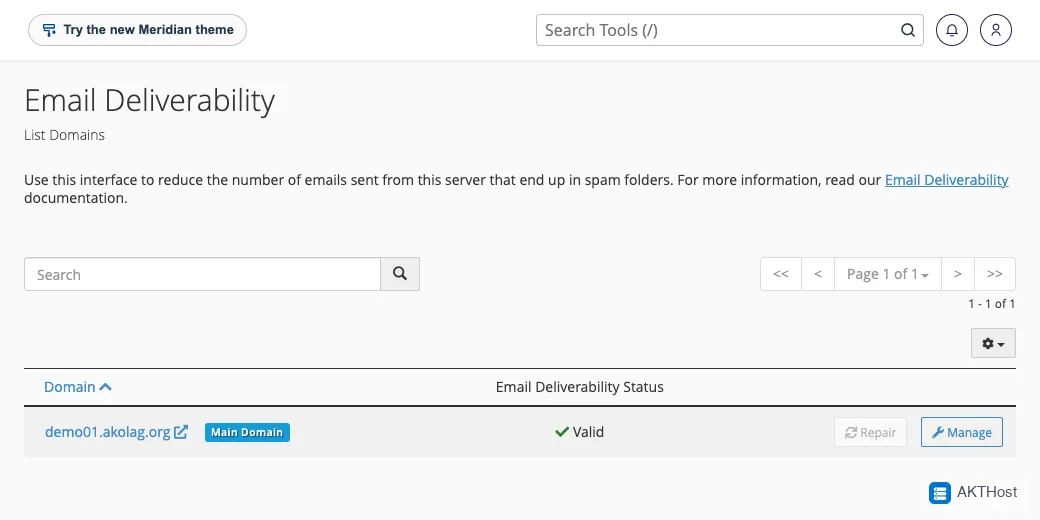
SPF is a note in your domain settings that lists who may send mail for you. In cPanel, open Email Deliverability and follow the repair suggestions it shows.
3 Turn on DKIM
DKIM adds a signature to each email. It is also in Email Deliverability in cPanel. If it says the record is missing, use the repair button.
4 Add DMARC
DMARC tells receivers what to do when a check fails. Start gently: add a DMARC record with the policy none and watch. Tighten it later.
5 Test and keep it clean
Send a test message to a free mailbox and open Show original to see if SPF and DKIM say pass. Avoid ALL CAPS, too many links, and buying email lists.
Domain changes can take some hours to reach everyone. Test again the next day.
Questions people ask
What are SPF, DKIM and DMARC?
They are short notes in your domain settings. SPF says who may send mail for you. DKIM signs each message. DMARC tells receivers what to do if a check fails.
I fixed it but mail still goes to spam. Why?
Changes to domain settings can take some hours to spread. Also check the content of your email and who you are sending to.